Best Mechanical Keyboards for Mac, Plus Two Ergonomic Options (2026)
Ten mechanical keyboards that work well with a Mac, sorted by layout and feel, plus two ergonomic boards for writers whose wrists come first.
This post contains affiliate links. If you buy through them, The Press Abides may earn a commission at no extra cost to you. As an Amazon Associate, The Press Abides earns from qualifying purchases. Details.
How these were chosen: from manufacturer specifications and published buyer feedback. They have not been tested first-hand. See the editorial standards.
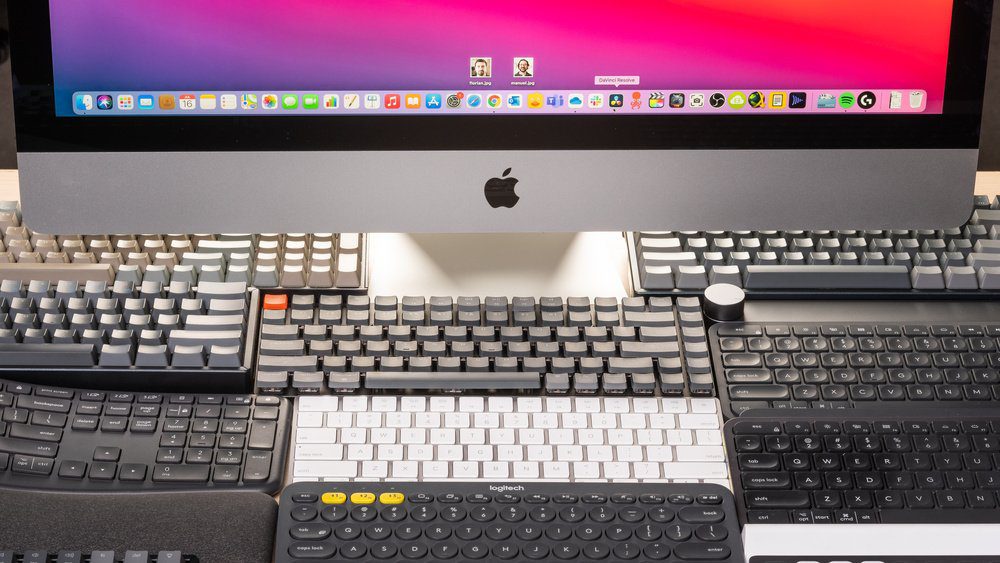
Finding the best mechanical keyboard for a Mac depends entirely on your desk space, your need for a number pad, and whether you prefer a wireless connection or a steady wired link. Some users prioritize a slim profile for travel, while others demand a full-size layout for heavy data entry. These products differ primarily in their physical footprint, connectivity options, and the depth of their customization software. If you want a premium, all-around wireless experience, the Logitech MX Mechanical is a frequent choice, whereas those seeking a compact, low-profile build often prefer the Keychron K3 Version 2.
Quick picks
- Best Overall: Logitech MX Mechanical
- Best Low-Profile: Keychron K3 Version 2
- Best Tenkeyless: Keychron K8 Wireless
- Best Customization: AULA F99 Wireless
- Best Compact Full-Size: Keychron K4 96%
- Best Aesthetic Design: Satechi SM3 Mechanical
- Best Feature Set: RK ROYAL KLUDGE S98
- Best Wired Full-Size: Keychron C2 Wired
- Best 75% Layout: Kisnt KN85 Wireless
- Best Full-Size Wireless: Keychron K10 Wireless
1. Logitech MX Mechanical Wireless Illuminated Keyboard Tactile

Best for: Someone who wants a premium, reliable keyboard for daily office work.
The MX Mechanical is designed for users who need a full-size layout but prefer a lower profile to reduce wrist strain. Its tactile switches offer a bump you can feel, providing clear feedback without the loud clicking noise that might bother colleagues in an office. The smart illumination is a standout feature, as it senses your hands and adjusts brightness based on the room’s light.
This keyboard is built for multi-device workflows, allowing you to pair with three systems at once. The Logitech Options+ software gives you control over function keys and backlighting effects. It isn’t for users who want to swap out their own mechanical switches, as the design is fixed and focused on a streamlined, plug-and-play experience.
Good if:
- You work across multiple devices.
- You need quiet but tactile typing.
- You prefer automatic backlighting.
Skip it if:
- You want to customize your switches.
2. Keychron K3 Version 2 QMK 75% Wireless Low-Profile Mechanical Keyboard

Best for: Someone who needs a highly portable, ultra-slim mechanical keyboard.
The K3 Version 2 is built for people who want a mechanical feel without the bulk of a standard board. Its 75% layout saves significant desk space by removing the number pad while keeping the essential navigation keys. The listing doesn’t mention how this keyboard compares to others in terms of thickness.
You can customize almost everything using the open-source QMK firmware and the Keychron Launcher web app. It’s a great fit for Mac users who want native multimedia key support. This model isn’t suited for people who rely on a dedicated number pad for daily spreadsheet work, as the compact layout prioritizes space over extra keys.
Good if:
- You have limited desk space.
- You want deep software customization.
- You travel with your keyboard.
Skip it if:
- You need a dedicated number pad.
- You dislike low-profile key switches.
3. Keychron K8 Tenkeyless Wireless Mechanical Keyboard

Best for: A user who wants a traditional, high-quality tenkeyless mechanical board.
The K8 is a standard-profile keyboard, which means the keys have more travel than low-profile models. This gives it a classic mechanical feel that many typists prefer for long sessions. With its 80% layout, it keeps your mouse closer to your body, which can help with ergonomics.
It offers both wired and wireless modes, making it versatile for both office work and light gaming. The K8 includes a 4000 mAh battery that supports up to 200 hours of use with the backlight off. It isn’t the right pick if you want the thinnest possible design, as it sits higher on the desk than the low-profile alternatives.
Good if:
- You prefer standard-height mechanical keys.
- You need a long battery life.
- You want a simple, reliable TKL layout.
Skip it if:
- You want a slim, low-profile keyboard.
- You need a built-in number pad.
4. AULA F99 Wireless Mechanical Keyboard

Best for: Someone who loves to modify their keyboard for a specific sound.
The F99 is a feature-packed board that uses a gasket structure and silicone padding to create a soft, elastic typing feel. It’s hot-swappable, so you can change the switches whenever you want to experiment with how the board feels or sounds. With three connection modes and the ability to link five devices, it’s built for users with complex setups.
The F99 includes an 8000mAh rechargeable battery. It includes RGB lighting with many effects, which is great for a gaming environment. It isn’t for a user who wants a minimalist, “no-fuss” setup, as the sheer number of features and lighting options might feel overwhelming.
Good if:
- You want to customize switches easily.
- You need a massive battery capacity.
- You enjoy RGB lighting effects.
Skip it if:
- You prefer a simple, clean aesthetic.
- You dislike managing complex software.
5. Keychron K4 96% Layout 100 Keys Wireless Bluetooth 5.1/Wired USB

Best for: Someone who wants a full-size layout in a smaller frame.
The K4 96% gives you a full number pad in a design that’s much smaller than a traditional 104-key board. It’s ideal for people who need to input numbers often but also want to keep their desk tidy. It supports both Mac and Windows layouts, with extra keycaps included for both systems.
The K4 includes a 4000 mAh battery that supports up to 240 hours of use with the backlight off. The tactile brown switches provide a balanced typing experience that works well for both typing documents and light gaming. It isn’t for users who prefer widely spaced keys, as the 96% layout packs the keys tightly together.
Good if:
- You need a number pad daily.
- You want to save desk space.
- You frequently switch between devices.
Skip it if:
- You prefer large gaps between key clusters.
- You need a full-size, traditional layout.
6. Satechi SM3 Mechanical Keyboard

Best for: A user who wants a sleek, professional look for their Mac.
The Satechi SM3 is a full-size keyboard that matches the aesthetic of a modern, professional office setup. The aluminum construction is durable and keeps the keyboard feeling solid under your hands. It connects to four devices at once, which is perfect for someone juggling a Mac, a laptop, and a tablet.
The low-profile brown switches are quiet, making this an excellent choice for shared workspaces. It includes dedicated Mac shortcuts, ensuring you don’t have to remap keys to get your brightness or volume controls working. It isn’t for users who want intense, colorful RGB lighting, as it sticks to a clean white backlight.
Good if:
- You want a premium aluminum build.
- You work in a shared office.
- You need a full-size layout.
Skip it if:
- You want customizable RGB colors.
- You want a compact, space-saving board.
7. RK ROYAL KLUDGE S98 Wireless Mechanical Keyboard w/Smart Display &

Best for: Someone who wants the latest tech features like a screen and knob.
The S98 is built for people who want total control at their fingertips. The small screen shows you battery status, connection mode, and even custom gifs, while the knob lets you adjust volume or lighting with a simple twist. It’s also hot-swappable, so you can change the feel of the board whenever you like.
The sound-absorbing foam inside makes the typing sound clear and quiet, avoiding that hollow “ping” sound some keyboards have. It’s a very modern board with a lot of personality. It isn’t for a minimalist who finds screens and knobs on a keyboard distracting or unnecessary.
Good if:
- You want a volume control knob.
- You like having a status screen.
- You want a quiet, dampened sound.
Skip it if:
- You prefer a simple, traditional keyboard.
- You find extra screens distracting.
8. Keychron C2 Full Size Wired Mechanical Keyboard

Best for: A first-time buyer who wants a reliable, no-nonsense wired keyboard.
The C2 is a straightforward, full-size wired keyboard. It doesn’t have a battery to charge or Bluetooth to pair, which makes it very easy to use. The retro color scheme is a nice touch for those who like a classic look, and the wired USB-C connection ensures you never have to worry about latency or power.
It’s designed with Mac users in mind, featuring all the necessary multimedia keys. The tactile switches are durable and provide a consistent feel. It isn’t for a user who wants the freedom to move their keyboard around the room, as it’s strictly a wired device.
Good if:
- You want a simple, wired setup.
- You need a full-size layout.
- You’re a first-time mechanical user.
Skip it if:
- You want a wireless or Bluetooth connection.
- You need backlighting for night work.
9. Kisnt KN85 Wireless Mechanical Keyboard
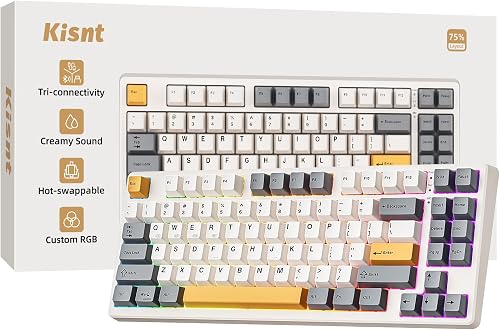
Best for: Someone who wants a “thocky” typing sound and a compact layout.
The KN85 is all about the typing experience. The gasket-mounted design and pre-lubed switches make every keypress feel smooth and sound deep, rather than loud and clicky. It’s a 75% layout, which is the perfect middle ground for people who want arrow keys but don’t need a number pad.
The tri-mode connectivity makes it easy to switch between your PC, tablet, or phone. It also includes RGB backlighting that can be adjusted to match your mood. It isn’t for users who need a number pad, as the compact design completely omits it to save space.
Good if:
- You want a smooth, deep typing sound.
- You need a compact 75% layout.
- You want easy wireless connectivity.
Skip it if:
- You need a number pad for work.
- You prefer a standard, full-size layout.
10. Keychron K10 Full Size 104 Keys Bluetooth Wireless Mechanical Gaming

Best for: A user who wants the standard full-size experience without the wires.
The K10 is a full-size, 104-key wireless keyboard that feels familiar from the moment you take it out of the box. It offers a large battery that lasts for hundreds of hours, meaning you rarely have to plug it in. It includes all necessary multimedia and function keys for both macOS and Windows.
The tactile brown switches are a great all-rounder for typing and gaming. It’s a solid, reliable workhorse for anyone who needs a full number pad and all the function keys. It isn’t for someone who wants to save space on their desk, as it occupies the full footprint of a standard keyboard.
Good if:
- You need a full-size 104-key layout.
- You want reliable wireless performance.
- You want long battery life.
Skip it if:
- You have a small desk.
- You prefer a modern, ultra-slim design.
If your wrists come first: two ergonomic keyboards
The ten keyboards above use standard layouts. If wrist or shoulder strain is the reason you are shopping, a split or curved board is the bigger change. Two worth comparing are the X9 split mechanical keyboard and the Logitech Ergo K860, which is curved and cushioned but not mechanical.
X9 Split Wireless

Where X9 Split Wireless Fits Best
- Great for quiet offices due to low-noise mechanical switches.
- Fits users who want both wireless and wired connection options.
- Useful for those needing a compact layout but still require a number pad.
- Works well for people who type in low-light environments.
Where X9 Split Wireless Struggles
- Mechanical feel may not suit those who prefer soft, non-mechanical keys.
- Limited to one backlight color (white) only.
Logitech Ergo K860

Where Ergo K860 Curved Keyboard Fits Best
- Suited for those who want a soft, pillowed wrist rest.
- Ideal for users focused on ergonomic wrist angles with adjustable palm lift.
- Works well for people who prefer scooped, non-mechanical keys.
- Fits offices where a certified ergonomic design is valued.
Where Ergo K860 Curved Keyboard Struggles
- No mechanical key switches, which might not satisfy mechanical keyboard fans.
- Does not offer backlighting, limiting use in low-light setups.
How the two compare
| X9 Split Wireless | Logitech Ergo K860 | |
|---|---|---|
| Key Type | Mechanical (silent pink switches) | Non-mechanical (Perfect Stroke) |
| Sound | Quiet for mechanical, soft thock | Very quiet, muted press |
| Typing Feedback | Linear and smooth | Soft, gentle feel |
| Bluetooth | Yes (Bluetooth 5.0) | Yes |
| 2.4G Wireless | Yes | Yes (with USB receiver) |
| Wired Option | Yes | No |
| Battery | Rechargeable (2000 mAh) | Battery powered, not specified as rechargeable |
| Device Switching | Manual switching | Simple pairing and switching |
| Wrist Support | Built-in palm rest | Pillowed wrist rest with memory foam |
| Adjustability | Fixed | Adjustable palm lift (-4, -7 degrees) |
| Material | Padded but not memory foam | Memory foam layer |
| Comfort Over Time | Supportive for most sessions | Very soft and cushioned feel |
| Backlighting | Yes, white backlight (4 levels) | No backlight |
| Ease of Use in Dark | Easy to see keys | Standard visibility only |
| Customizable Light | No, only white | N/A |
| Layout | Split, compact with number pad | Curved, split keyframe, full-size |
| Desk Space | Requires less space | Requires more space |
| Function Row | Included | Included |
| Shortcut Functions | Yes | Yes |
| Portability | More portable | Less portable |
| Visual Style | Minimal, modern | Curved, professional |
Which of the two to choose
Pick the X9 Performance Wireless Mechanical Ergonomic Keyboard if you want mechanical switches, multiple wireless and wired options, and often type in low light. Its compact design and built-in palm rest make it a solid choice for small desks or flexible setups.
The Logitech Ergo K860 Curved Keyboard is the better fit for those who value a curved keyframe, memory foam wrist support, and certified ergonomic posture. It suits users who want a soft, quiet typing feel and adjustable wrist angle.
Both models deliver comfort, but their approaches make each more suitable for different needs.
Where the ten overlap
Many of these mechanical keyboards share the same basic DNA. For example, the Keychron K8, K4, and K10 all offer similar tactile brown switches, Mac-first layouts, and reliable Bluetooth 5.1 connections. If you’re choosing between these, the decision comes down to the physical layout—TKL, 96%, or full-size—rather than differences in performance or build quality.
Similarly, the Kisnt KN85 and the Keychron K3 Version 2 both target the compact, space-saving market. While they differ in their profile (the K3 is ultra-slim, the KN85 has a deeper “thocky” sound), they occupy the same niche for users who prioritize desk real estate. The choice here is purely about whether you prefer the low-profile, travel-friendly design of the K3 or the gasket-mounted, sound-focused build of the KN85. In these cases, the listings provide enough detail to distinguish the physical experience, even when the internal specs are nearly identical.
Still not sure?
How often will I actually move my keyboard?
If you plan to throw your keyboard in a bag to take to a coffee shop or between rooms, you should prioritize a compact, lightweight option like the Keychron K3 Version 2. These boards are designed for portability. If your keyboard will stay on your desk 99% of the time, you can ignore portability and choose a full-size model like the Keychron K10 or the Satechi SM3, which provide more comfort and functionality for long work days.
Do I really need a number pad?
If you work in accounting, data entry, or use spreadsheets every day, a number pad is essential for your efficiency. The Keychron K4 is a clever compromise, giving you the number pad while keeping the footprint small. If you rarely type numbers, you’re better off with a compact or TKL layout like the Kisnt KN85 or Keychron K8. These layouts give your mouse more room to move, which is better for your posture and gaming performance.
Am I looking for a specific typing sound?
Mechanical keyboards vary wildly in sound, from the “thocky” and dampened feel of the RK ROYAL KLUDGE S98 or Kisnt KN85 to the sharper, more tactile feedback of the Logitech MX Mechanical. If you work in a quiet office, you should look for boards with sound-absorbing foam or quiet switches to keep the noise down. For a deeper, more satisfying sound, look for hot-swappable boards that allow you to experiment with different switches.
Frequently asked questions
Can I use these mechanical keyboards with a Mac?
Every keyboard on this list is designed to work with macOS. Most models include dedicated Mac multimedia keys and extra keycaps for the Command and Option keys. You may need to use software to remap keys on boards that lack a native Mac layout.
How do I connect these to multiple devices?
Most of these keyboards use Bluetooth 5.0 or 5.1 to connect to up to three devices simultaneously. You typically switch between your Mac, iPad, or phone by pressing a combination of keys, such as Fn+1, Fn+2, or Fn+3. Models like the Satechi SM3 and AULA F99 even support wired and 2.4GHz USB connections, which can be faster if you’re gaming or working in an environment with a lot of wireless interference.
What is a hot-swappable keyboard?
A hot-swappable keyboard allows you to replace mechanical switches without soldering. This feature lets you change the typing feel or replace a faulty switch easily. Models like the RK ROYAL KLUDGE S98 and Kisnt KN85 include the necessary puller tools in the box.
How long does the battery last on wireless models?
Battery life varies significantly based on whether you use backlighting. The Keychron K8 and K10 last up to 240 hours with backlighting off, while the Logitech MX Mechanical lasts up to 10 months. Some models, like the AULA F99, prioritize longevity with an 8000mAh battery.
Do Both Keyboards Support Mac And Windows?
Yes, both X9 Split Wireless and Ergo K860 Curved Keyboard are compatible with Windows and Mac. You may need to adjust some shortcut keys, but basic functions work out of the box.
Is The X9 Split Wireless Truly Silent For Mechanical?
The X9 model uses silent pink switches, which are much quieter than most mechanical keyboards. While not completely silent, the sound is soft and less intrusive than typical mechanical keys.
Can I Use Either Keyboard Wired?
The X9 Split Wireless offers a wired mode for stable connections. The Ergo K860 Curved Keyboard does not have a wired option; it is wireless only.
Is There A Big Learning Curve With Split Keyboards?
Some users need a few days to get used to the split layout. Once familiar, most people find typing more comfortable and natural for longer periods.
Which Keyboard Is Better For Small Desks?
The X9 Split Wireless is more compact and better suited for tight desk spaces. The Ergo K860 Curved Keyboard has a larger footprint due to its curved design.
Does Either Keyboard Have Customizable Lighting?
The X9 Split Wireless has white backlighting with four brightness levels, but no color customization. The Ergo K860 Curved Keyboard does not offer any backlighting.
Are The Wrist Supports Removable?
Both keyboards have built-in wrist supports that are not removable. They are designed to provide consistent support as part of the ergonomic design.
The short version
Choosing the right board comes down to how your hands feel after a long day of typing. Once you’ve picked a layout that fits your workflow, don’t be afraid to swap out the keycaps or switches later on. You’ll find that personalizing your setup makes the daily grind feel much better.